# monitor RAID5 health status on ShengLab Ubuntu Server
# and send email alerts if any issues are detected.
# sudo crontab -e
# 0 6 * * * /data/softwares/miniconda3/envs/galaxy_utils/bin/python /opt/server_management_misc/raid_monitor.py > /opt/server_management_misc/raid_monitor.py.log 2>&1
import subprocess
import re
import smtplib
import markdown
from email.mime.text import MIMEText
from email.mime.multipart import MIMEMultipart
from datetime import datetime
from dotenv import load_dotenv
import os

# load environment variables from .env file
script_dir = os.path.dirname(os.path.abspath(__file__))
load_dotenv(os.path.join(script_dir, ".env"))

# for test only
# ADMIN_PASSWORD = os.getenv("ADMIN_PASSWORD")

# 1. email configurations
SMTP_SERVER = os.getenv("SMTP_SERVER")
SMTP_PORT = int(os.getenv("SMTP_PORT"))
SMTP_USER = os.getenv("SMTP_USER")
SMTP_PASS = os.getenv("SMTP_PASS")
RECEIVER = [
    re.sub(r"\s+", "", e) for e in os.getenv("RECEIVER").split(";") if e.strip()
]
SLOT_NUM = int(os.getenv("SLOT_NUM"))

# 2. command path
PERCCLI_PATH = os.getenv("PERCCLI_PATH")


def get_output(cmd):
    try:
        return subprocess.check_output(f"{PERCCLI_PATH} {cmd}", shell=True, text=True)
        # return subprocess.check_output(
        #     f"sudo -S {PERCCLI_PATH} {cmd}", shell=True, text=True, input=ADMIN_PASSWORD
        # )
    except Exception:
        return None


def parse_data():
    vd_out = get_output("/c0/vall show")
    pd_out = get_output("/c0/eall/sall show all")

    if (vd_out is None) or (pd_out is None):
        return None, None

    # check virtual drive status
    vd_table = None
    vd_table_pattern = (
        r"(\d+/\d+)\s+(RAID\d+)\s+(\w+)\s+(\w+)\s+(\w+)\s+(\w+)\s+.*?\s+(\d+\.\d+\s+TB)"
    )
    vd_table_match = re.search(vd_table_pattern, vd_out)
    if vd_table_match:
        vd_table = {
            "ID": vd_table_match.group(1),
            "Type": vd_table_match.group(2),
            "State": vd_table_match.group(3),
            "Access": vd_table_match.group(4),
            "Consistency": vd_table_match.group(5),
            "Cache Policy": vd_table_match.group(6),
            "Size": vd_table_match.group(7),
        }

    # check physical drive status
    pd_table = []
    pd_block_pattern = r"Drive /c\d+/e\d+/s\d+ :"
    pd_blocks = re.split(pd_block_pattern, pd_out)
    pd_blocks = pd_blocks[1:]
    pd_table_pattern = r"(?P<eid_slt>\d+:\d+)\s+(?P<did>\d+)\s+(?P<state>\w+)\s+(?P<dg>\d+)\s+(?P<size>\d+\.\d+\s+TB)\s+(?P<intf>\w+)\s+(?P<med>\w+)\s+(?P<sed>\w+)\s+(?P<pi>\w+)\s+(?P<sesz>\w+)\s+(?P<model>\S+)\s+(?P<sp>\w+)"
    for pd_block in pd_blocks:
        try:
            pd_table_match = re.search(pd_table_pattern, pd_block)
            if not pd_table_match:
                continue

            med_err = int(
                re.search(r"Media Error Count\s*=\s*(\d+)", pd_block).group(1)
            )
            other_err = int(
                re.search(r"Other Error Count\s*=\s*(\d+)", pd_block).group(1)
            )
            pred_fail = int(
                re.search(r"Predictive Failure Count\s*=\s*(\d+)", pd_block).group(1)
            )
            smart = re.search(
                r"S.M.A.R.T alert flagged by drive\s*=\s*(\w+)", pd_block
            ).group(1)
            temp = re.search(r"Drive Temperature\s*=\s*(\S+?C)", pd_block).group(1)
            pd_table.append(
                {
                    "Slot Location": pd_table_match.group("eid_slt"),
                    "Device ID": pd_table_match.group("did"),
                    "Drive State": pd_table_match.group("state"),
                    "Drive Group": pd_table_match.group("dg"),
                    "Capacity": pd_table_match.group("size"),
                    "Interface": pd_table_match.group("intf"),
                    "Media Type": pd_table_match.group("med"),
                    "Encryption": pd_table_match.group("sed"),
                    "Data Protection": pd_table_match.group("pi"),
                    "Sector Size": pd_table_match.group("sesz"),
                    "Model Name": pd_table_match.group("model"),
                    "Spin Status": pd_table_match.group("sp"),
                    "Media Error Count": med_err,
                    "Other Error Count": other_err,
                    "Predictive Failure Count": pred_fail,
                    "SMART Alert": smart,
                    "Temperature": temp,
                }
            )
        except Exception:
            continue

    if len(pd_table) == 0:
        pd_table = None
    return vd_table, pd_table


def evaluate_health(vd_table, pd_table, slot_num=12):
    if (vd_table is None) or (pd_table is None):
        return "ERROR", "无法获取或解析数据!"

    messages = []
    level = "INFO"
    expected_slots = set(range(slot_num))
    found_slots = set()

    for drive in pd_table:
        slot_id = int(drive["Slot Location"].split(":")[1])
        found_slots.add(slot_id)

        if (
            (drive["Media Error Count"] > 0)
            or (drive["SMART Alert"].lower() == "yes")
            or (drive["Predictive Failure Count"] > 0)
            or (drive["Other Error Count"] > 0)
        ):
            level = "ERROR"
            messages.append(
                f"Slot {slot_id} 硬件报警(Media Error Count: {drive['Media Error Count']}; SMART Alert: {drive['SMART Alert']}; Predictive Failure Count: {drive['Predictive Failure Count']}; Other Error Count: {drive['Other Error Count']})"
            )

        if drive["Drive State"] != "Onln":
            new_level = "WARNING" if drive["Drive State"] == "Rbld" else "ERROR"
            if level != "ERROR":
                level = new_level
            messages.append(f"Slot {slot_id} 的状态为 {drive['Drive State']}")

    missing_slots = expected_slots - found_slots
    if missing_slots:
        if level != "ERROR":
            level = "WARNING"
        messages.append(
            f"缺失物理硬盘: Slot {list(missing_slots)},请尽快插入以确保 RAID5 的冗余保护!"
        )

    vd_state = vd_table["State"]
    if vd_state == "Dgrd":
        if level != "ERROR":
            level = "WARNING"
        messages.append("RAID5 处于降级模式,失去冗余保护,请尽快插回硬盘!")
    elif vd_state != "Optl":
        level = "ERROR"
        messages.append(f"逻辑卷状态异常: {vd_state}")

    if not messages:
        messages.append(f"{slot_num} 块硬盘均运行正常。")

    return level, " | ".join(messages)


def send_mail(eval_level, eval_message, vd_table, pd_table):
    now = datetime.now().strftime("%Y-%m-%d %H:%M")

    if vd_table:
        vd_section = "\n".join(
            [
                "| ID | Type | State | Access | Consistency | Cache Policy | Size |",
                "|:---:|:---:|:---:|:---:|:---:|:---:|:---:|",
                f"| {vd_table['ID']} | {vd_table['Type']} | **{vd_table['State']}** | {vd_table['Access']} | {vd_table['Consistency']} | {vd_table['Cache Policy']} | {vd_table['Size']} |",
            ]
        )
    else:
        vd_section = "**[ERROR] 无法获取逻辑卷信息**"

    if pd_table:
        pd_header = "| Slot | State | Media Error | Other Error | Predictive Failure | SMART Alert | Temperature | Model |"
        pd_divider = "|:---:|:---:|:---:|:---:|:---:|:---:|:---:|:---:|"
        pd_rows = []
        for d in sorted(pd_table, key=lambda x: int(x["Slot Location"].split(":")[1])):
            row = f"| {d['Slot Location']} | **{d['Drive State']}** | **{d['Media Error Count']}** | **{d['Other Error Count']}** | **{d['Predictive Failure Count']}** | **{d['SMART Alert']}** | {d['Temperature']} | {d['Model Name']} |"
            pd_rows.append(row)
        pd_section = "\n".join([pd_header, pd_divider] + pd_rows)
    else:
        pd_section = "**[ERROR] 无法获取物理硬盘详情**"

    body = "\n".join(
        [
            "## ShengLab Ubuntu Server RAID5 Health Report\n",
            f"**检查时间:** {now}\n",
            f"**风险等级:** {eval_level}\n",
            f"**健康摘要:** {eval_message}\n",
            "## 1. 逻辑卷状态 (Virtual Drive)\n",
            f"\n{vd_section}\n",
            "## 2. 物理硬盘详情 (Physical Drive)\n",
            f"\n{pd_section}\n",
            "### For guidance on checking other hardware health, please refer to https://172.16.50.209/.\n",
            "*注意: 本报告由服务器 ShengLab Ubuntu Server 自动生成。请勿回复!*\n",
        ]
    )

    html_body = markdown.markdown(body, extensions=["tables"])
    styled_html = f"""
    <html>
    <head>
    <style>
        table {{ border-collapse: collapse; width: 100%; font-size: 14px; }}
        th, td {{ border: 1px solid #ccc; padding: 8px; text-align: left; }}
        th {{ background-color: #f4f4f4; }}
        strong {{ color: #e74c3c; }}
    </style>
    </head>
    <body>{html_body}</body>
    </html>
    """
    styled_html = styled_html.replace("\n", "")

    # msg = MIMEText(body, "plain", "utf-8")
    msg = MIMEMultipart("alternative")
    msg["Subject"] = f"[{eval_level}] RAID5 health check - ShengLab Ubuntu Server"
    msg["From"] = SMTP_USER
    msg["To"] = ", ".join(RECEIVER)

    msg.attach(MIMEText(styled_html, "html", "utf-8"))
    msg.attach(MIMEText(body, "plain", "utf-8"))

    try:
        with smtplib.SMTP_SSL(SMTP_SERVER, SMTP_PORT, timeout=20) as server:
            server.login(SMTP_USER, SMTP_PASS)
            server.send_message(msg, from_addr=SMTP_USER, to_addrs=RECEIVER)
            print(f"[{now}] 邮件发送成功: {eval_level}")
    except Exception as e:
        print(f"[{now}] 邮件发送失败: {e}")


if __name__ == "__main__":
    vd_table, pd_table = parse_data()
    eval_level, eval_message = evaluate_health(vd_table, pd_table, slot_num=SLOT_NUM)

    now = datetime.now()
    # is_monday = now.weekday() == 0
    # is_monthly_first_day = now.day == 1
    is_biweekly_monday = (now.weekday() == 0) and (now.isocalendar()[1] % 2 == 0)

    if eval_level in ["ERROR", "WARNING"] or is_biweekly_monday:
        send_mail(eval_level, eval_message, vd_table, pd_table)
    else:
        print(
            f"[{datetime.now().strftime('%Y-%m-%d %H:%M')}] RAID5 状态正常,无需发送邮件。"
)1 Introduction
This document serves as a guide for using the Sheng Lab Ubuntu server to perform data analysis and manage data storage.
NoteAvailable resources
System: Ubuntu Desktop 22.04 with Linux kernel 6.8.
CPU: dual CPUs with a total of 76 cores and 152 threads.
GPU: dual RTX 3090 (24G VRAM each).
Memory: 2T.
Disk:
/directory: 480G (for system use only)./homedirectory: 10T (accessible to all users with SSH login permissions)./datadirectory: 100T (intended to be used solely for data analysis)./archivedirectory: 130T (intended to be used solely for data storage).
WarningWarnings
Do NOT store any system-irrelevant data in the
/directory.User software should be installed in their respective home directories (Miniconda3 is highly recommended for software installations).
Do NOT store large volumes of data in your home directory. Instead, place them in the
/datadirectory, where you should create a subdirectory (e.g.,/data/lihua), mirroring the structure of the/homedirectory.All data uploaded via SFTP client will be stored in the
/archivedirectory, where each user has their own subdirectory (e.g.,/archive/lihua), mirroring the structure of the/homedirectory.Unauthorized modification/deletion of others’ data is prohibited and may result in system damage or account suspension.
The server IP address is 172.16.50.209, which is an internal IP address. This means it is inaccessible from outside the internal network.
Before using the server, you must contact your administrator to obtain an account.
2 Data analysis
For data analysis, you can log in to the server using an SSH client, such as Linux terminal, macOS terminal, Windows WSL, VSCode (highly recommended), etc. For R-based analysis, you can alternatively access RStudio Server at https://172.16.50.209/rstudio/server/.
NoteNotes
Logging in to the server via SSH requires SSH access permissions. Before attempting to connect, please contact your administrator to verify that you have SSH login privileges.
We also offer some pre-built, zero-code analysis pipelines:
NeuroBorder Galaxy for data analysis:
https://172.16.50.209/galaxy/neuroborder/.NeuroBorder Shiny web application for data visualization:
https://172.16.50.209/r-shiny/neuroborder/.For how-to user guides, please visit:
https://172.16.50.209andhttps://172.16.50.209/Blogs/Galaxy/.
3 Data storage
For data storage, you may use an SFTP client to transfer files to/from the server. All authorized users have SFTP transfer permissions.
Recommended free SFTP clients: FileZilla (Linux/macOS/Windows) from https://filezilla-project.org, WinSCP (highly recommended for Windows) from https://winscp.net/eng/index.php.
Users with SSH login privileges can also transfer files using commands like scp.
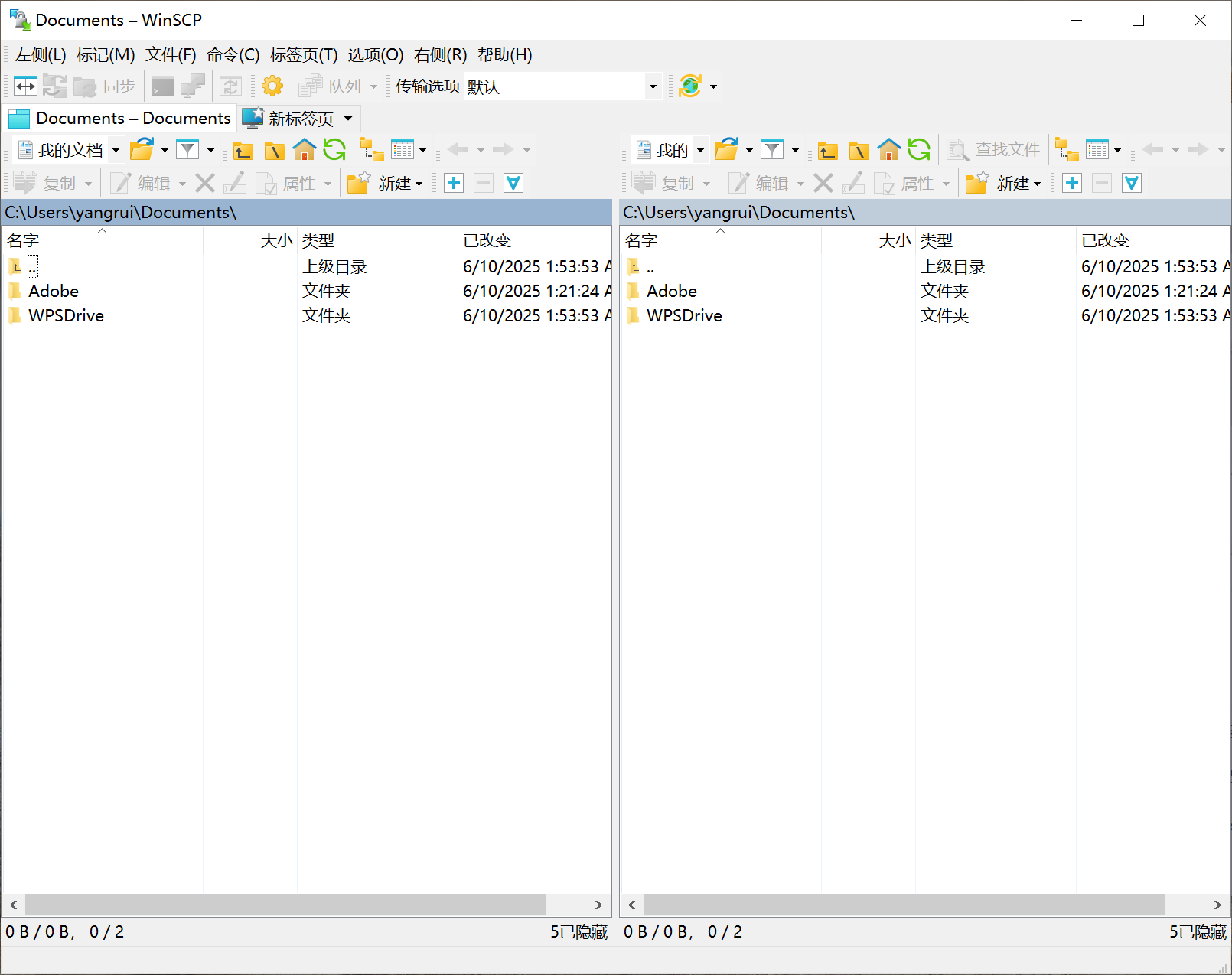
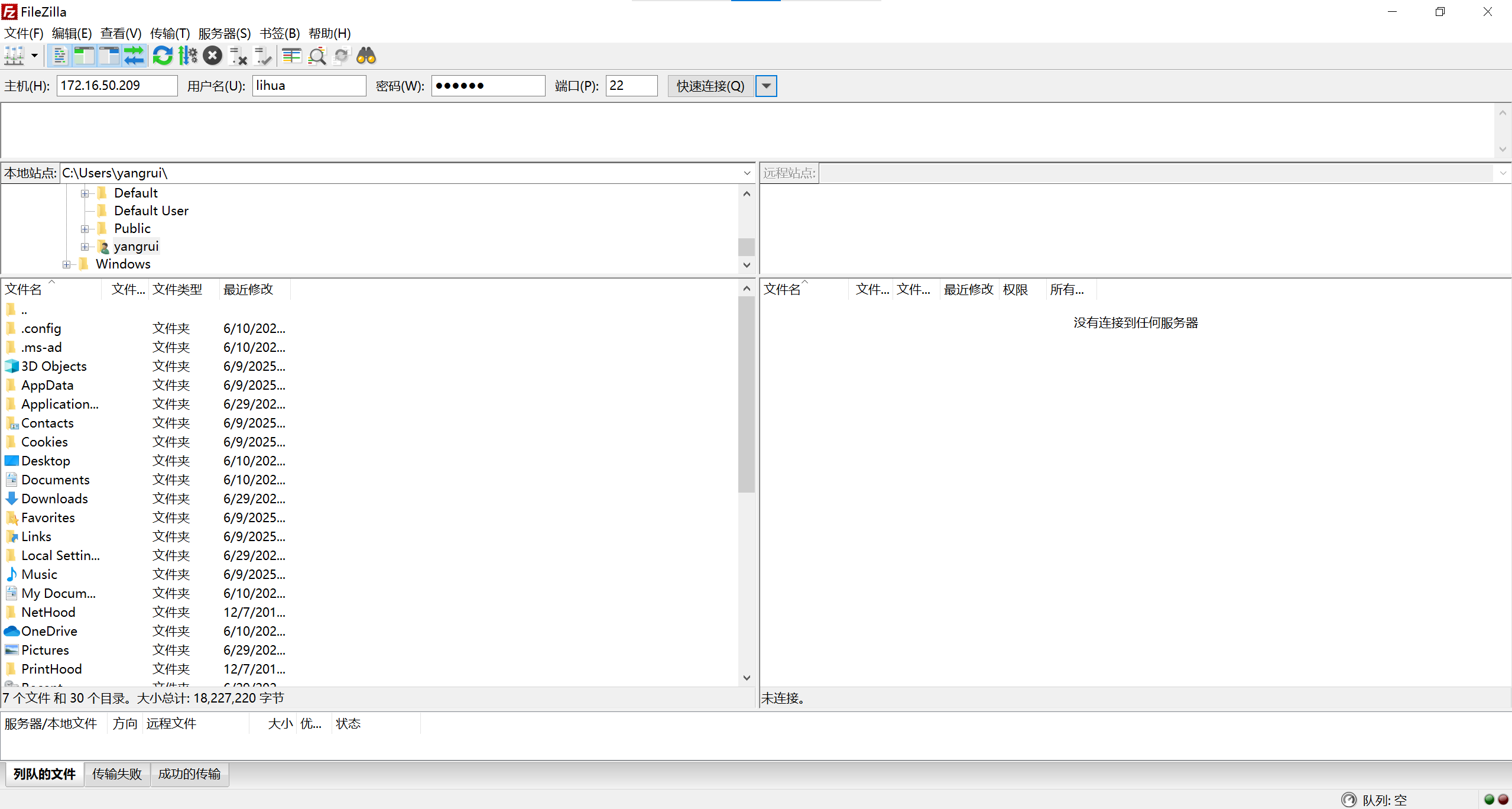
For both FileZilla and WinSCP, once you have logged in successfully, you will see the main panel. The left side displays your local directories, while the right side shows the remote directories. You can transfer files to or from the server by dragging and dropping them between the two panels. Right-clicking allows you to perform additional operations, such as creating a new directory or deleting files/directories.
The followings are guides for how to install and run both FileZilla and WinSCP:
NoteInstall and run FileZilla
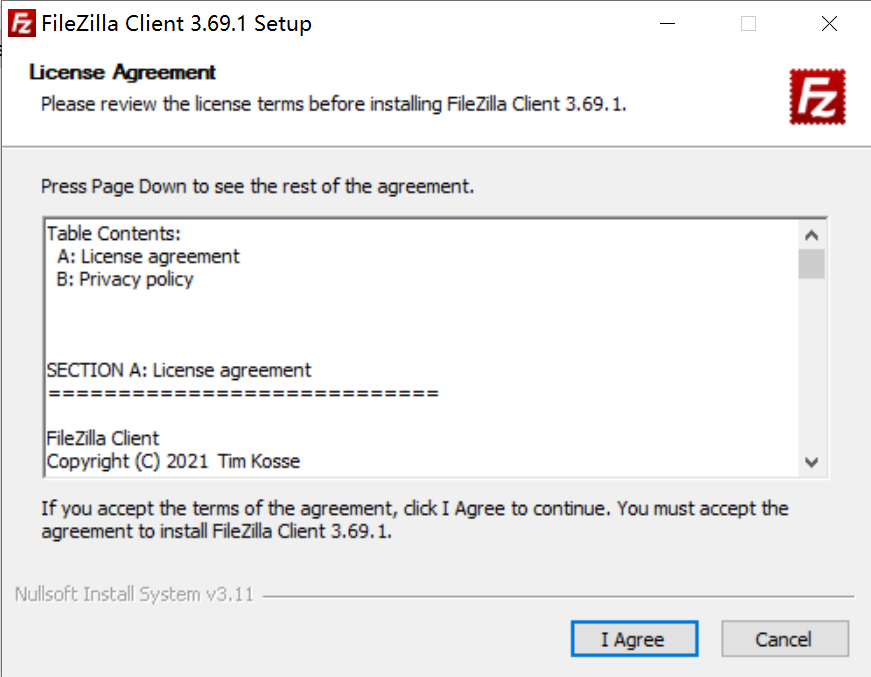
- Click “I Agree”:
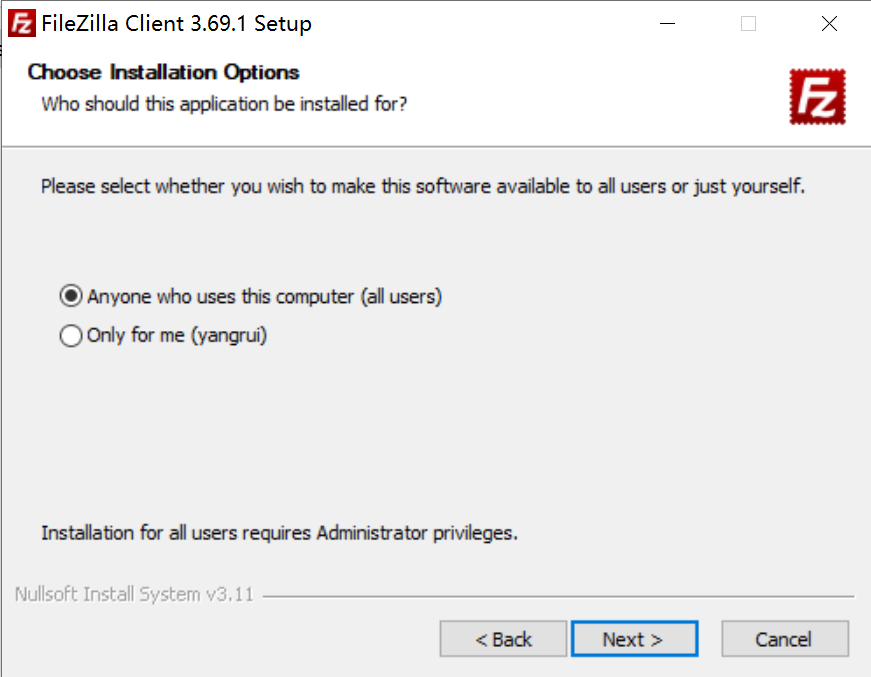
- Click “Next”:
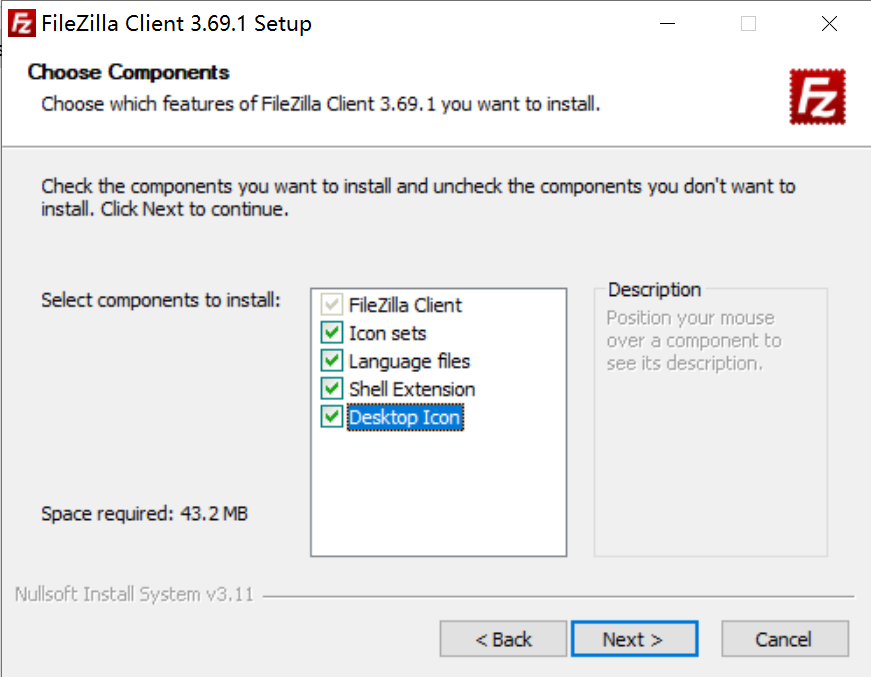
- Select “Desktop Icon” and then click “Next”:
- Select a destination folder and then click “Next”:
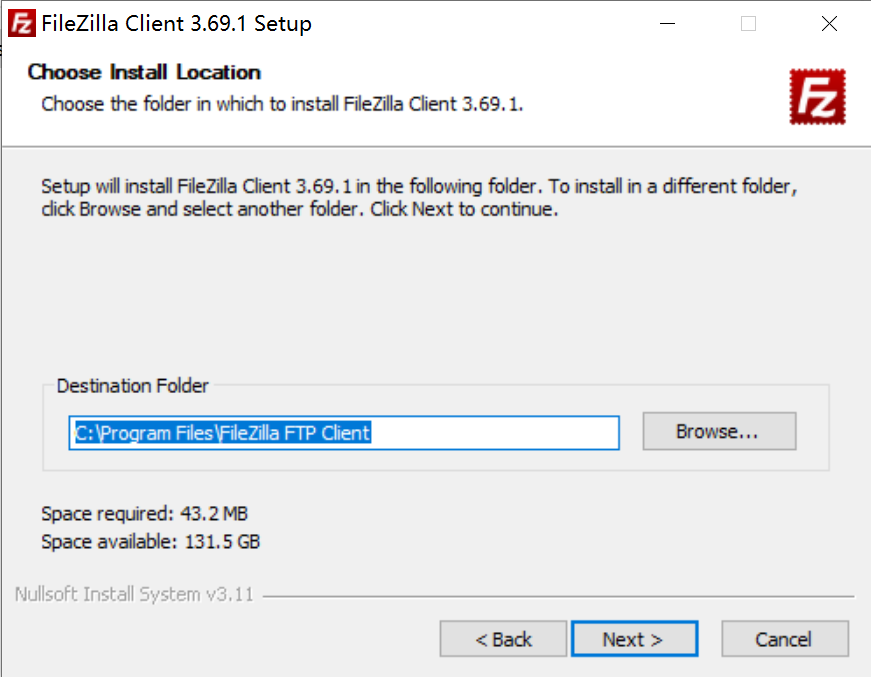
- Click “Install”:
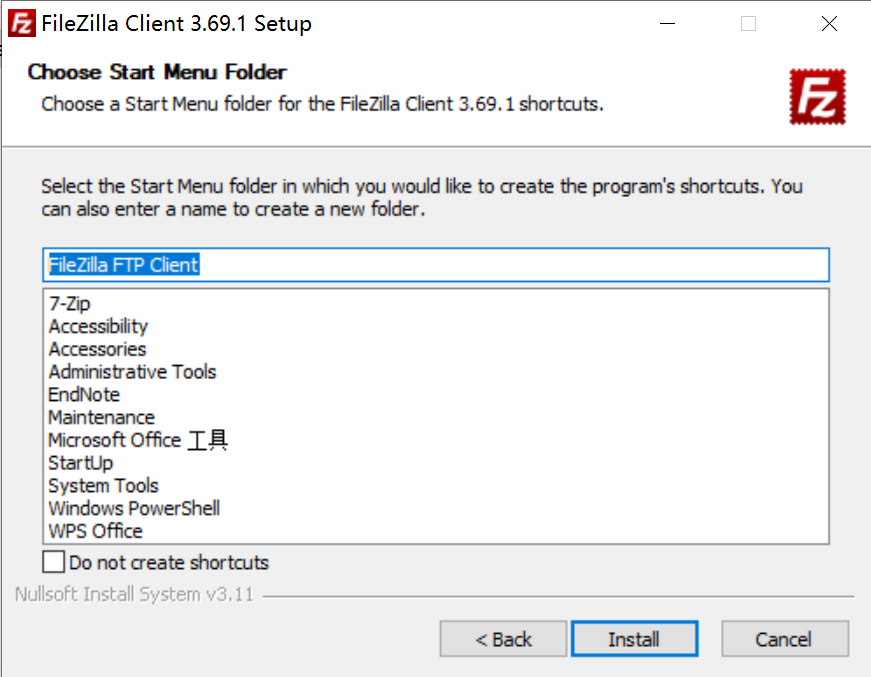
- Open FileZilla: fill host name (
172.16.50.209), user name, password, as well as port (22), and then click “Quick Connection”.
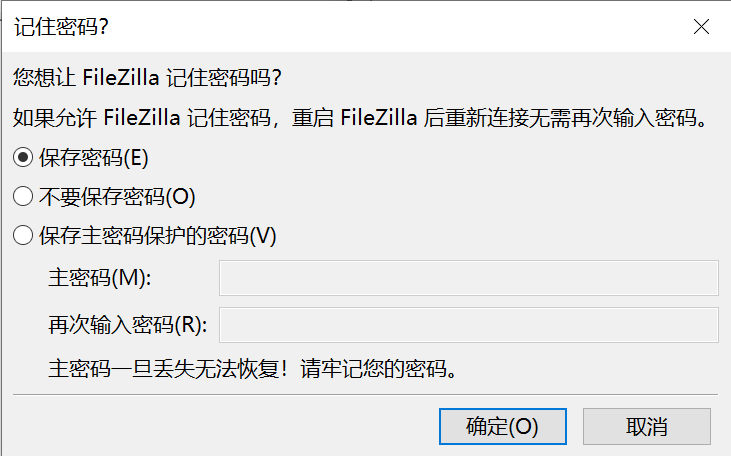
- Click “Confirm”: saving password is not recommended for safety consideration.
NoteInstall and run WinSCP
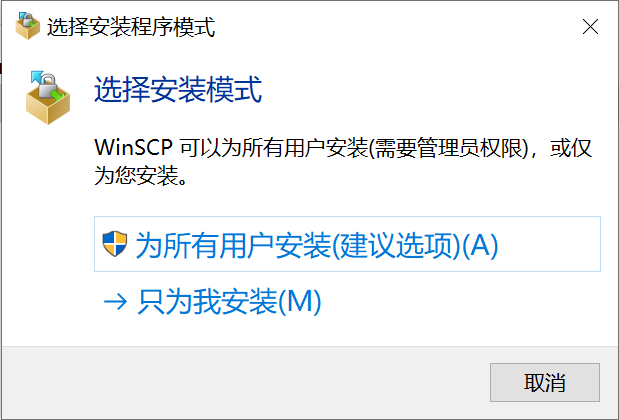
- Select “Install for all users”:
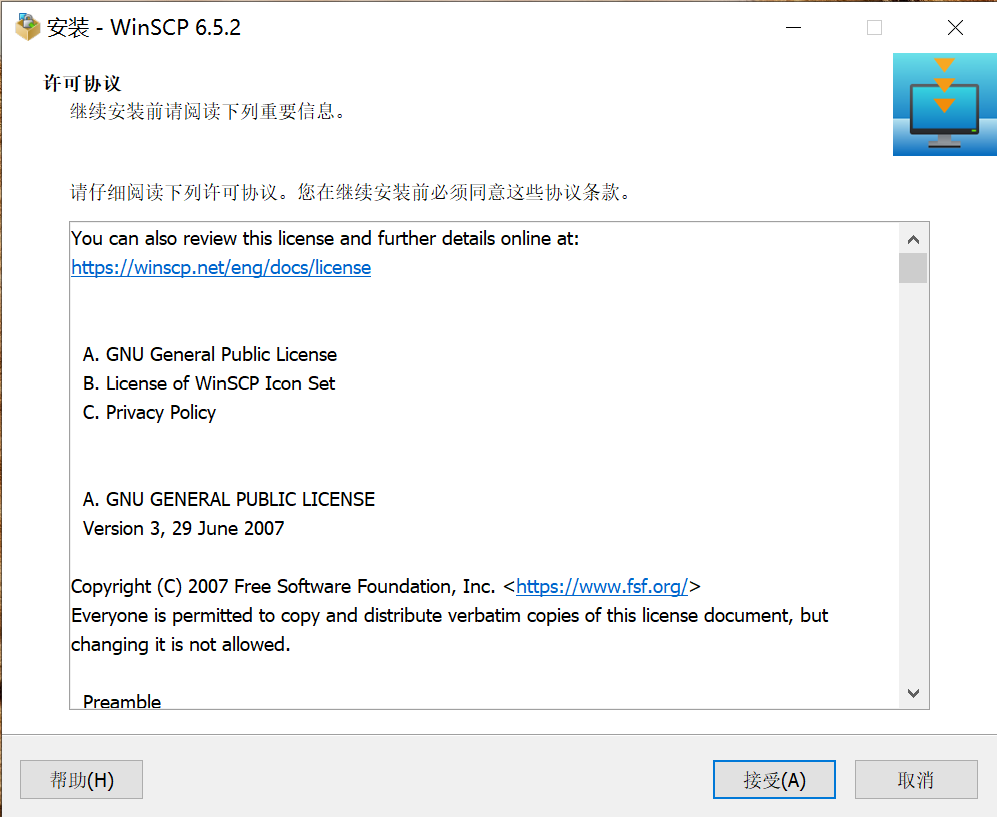
- Click “I Agree”:
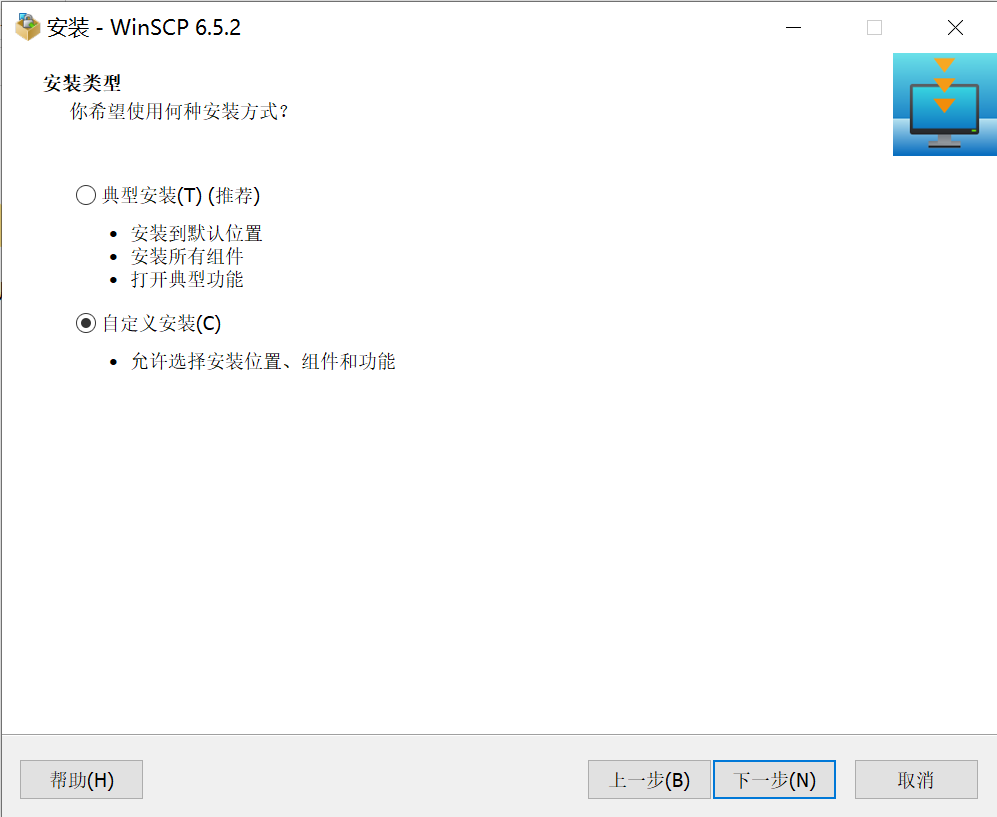
- Select “Customized installation” and then click “Next”:
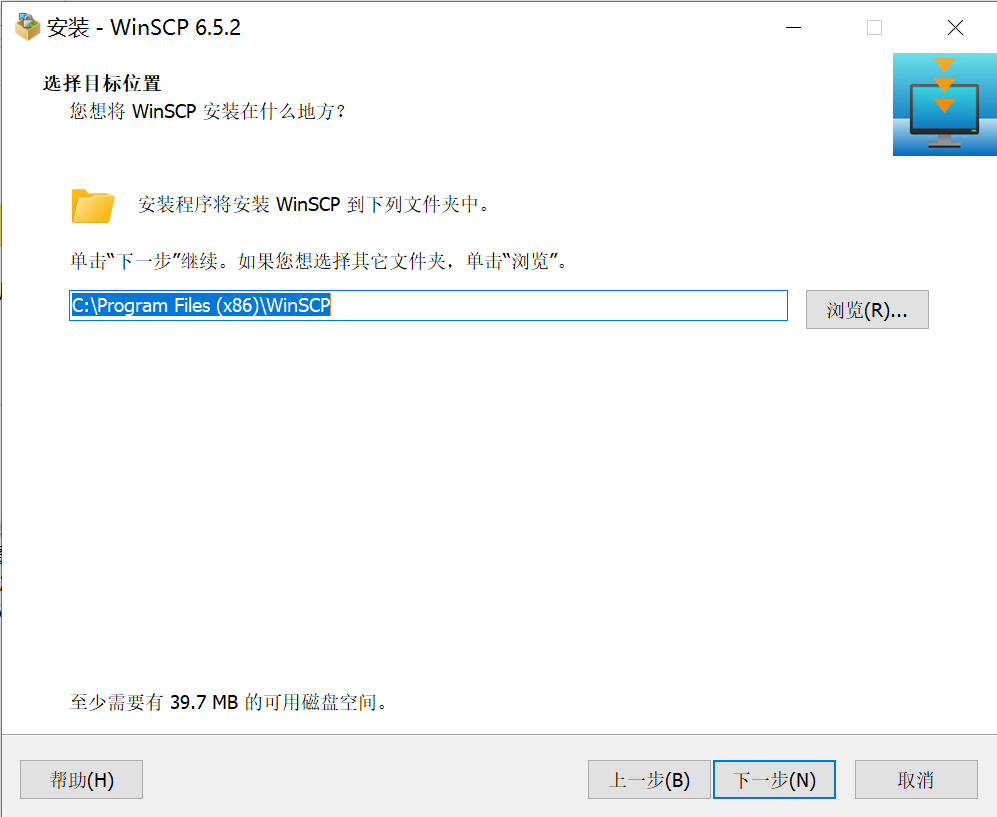
- Select a destination folder and then click “Next”:
- Click “Next”:
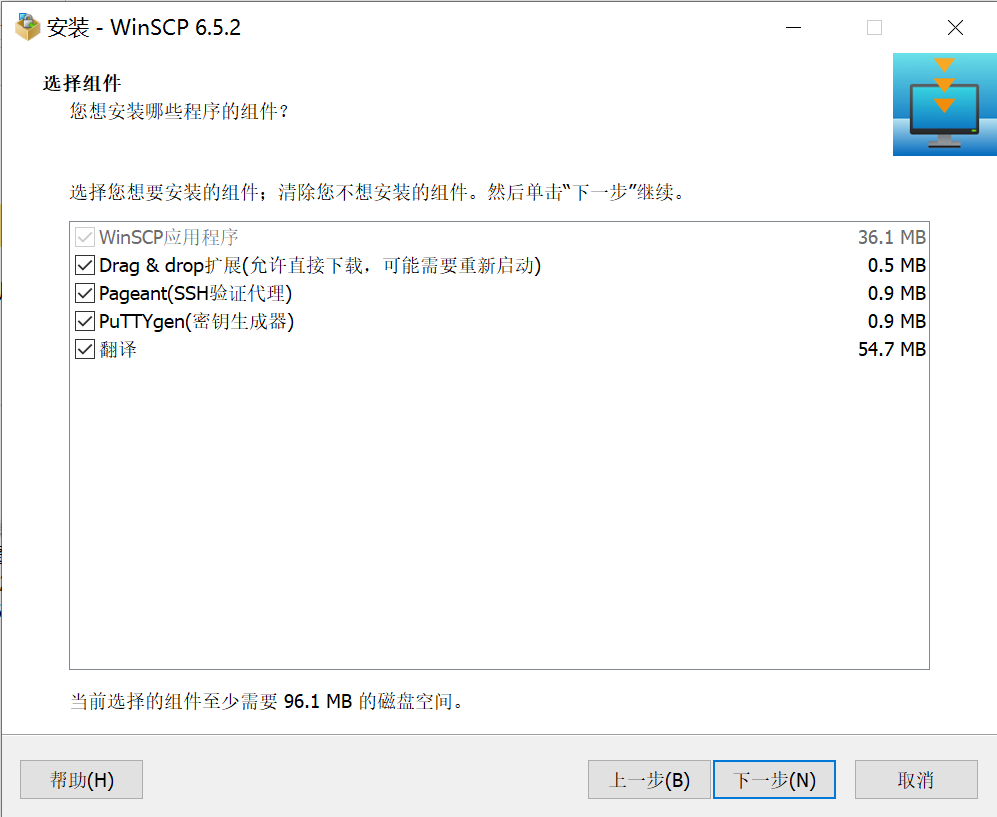
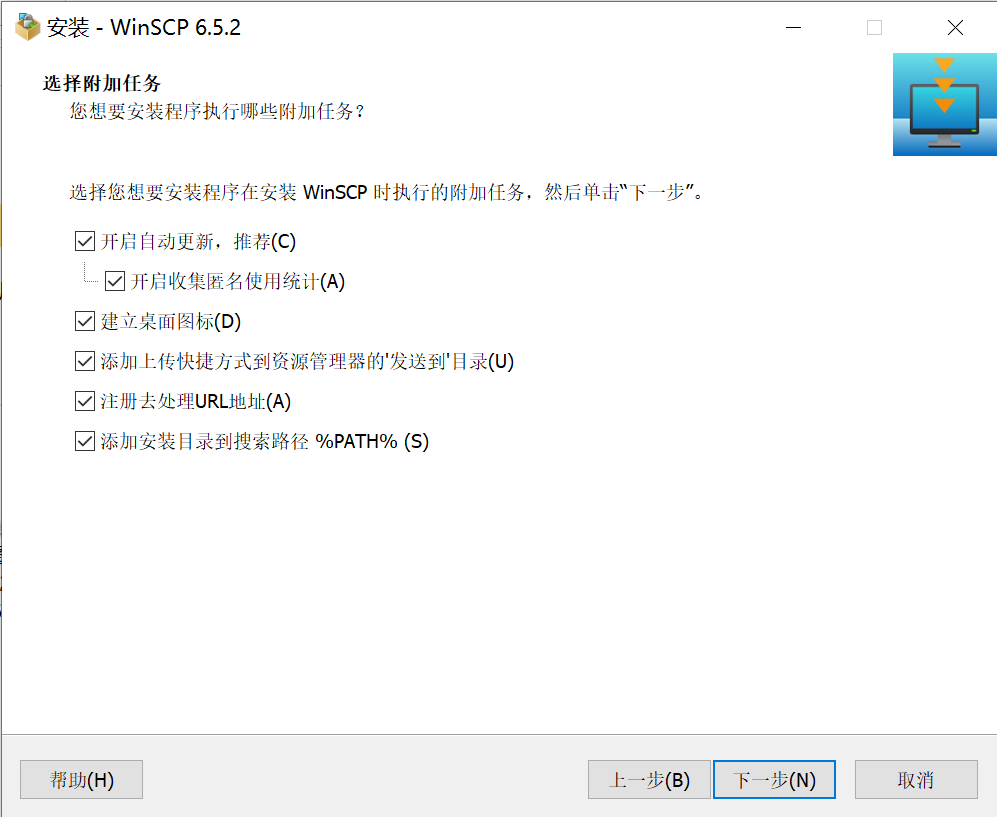
- Select “Add installation path to search path %PATH%” and then click “Next”:
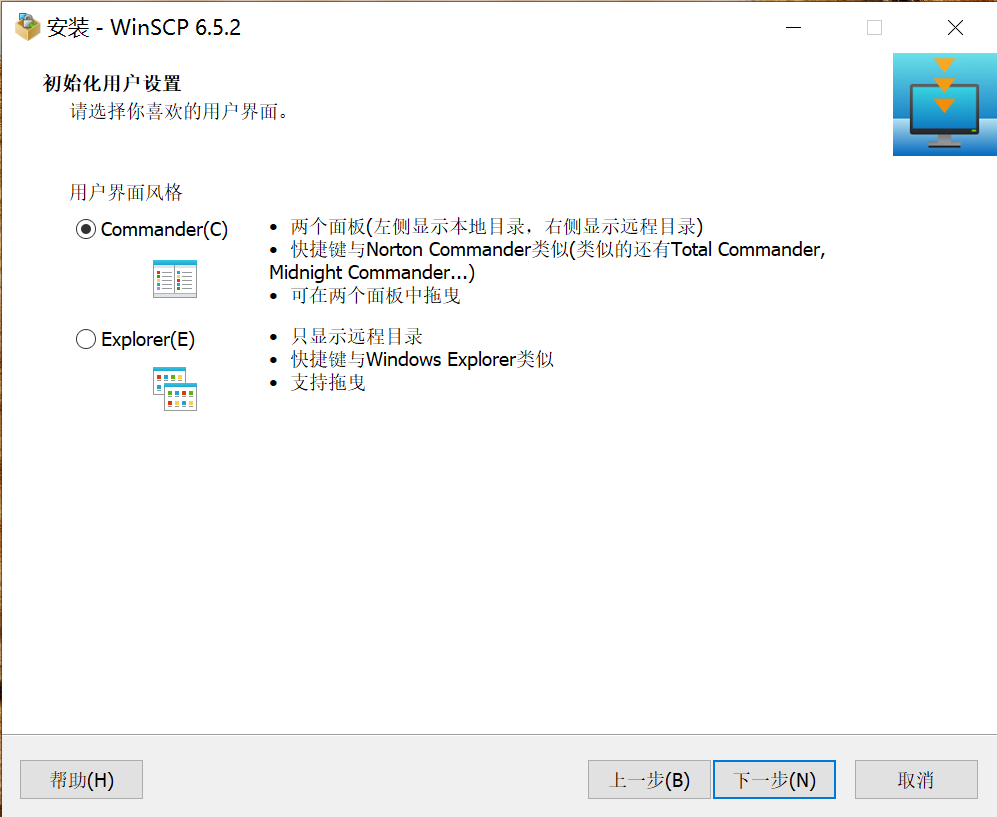
- Select “Commander” and then click “Next”:
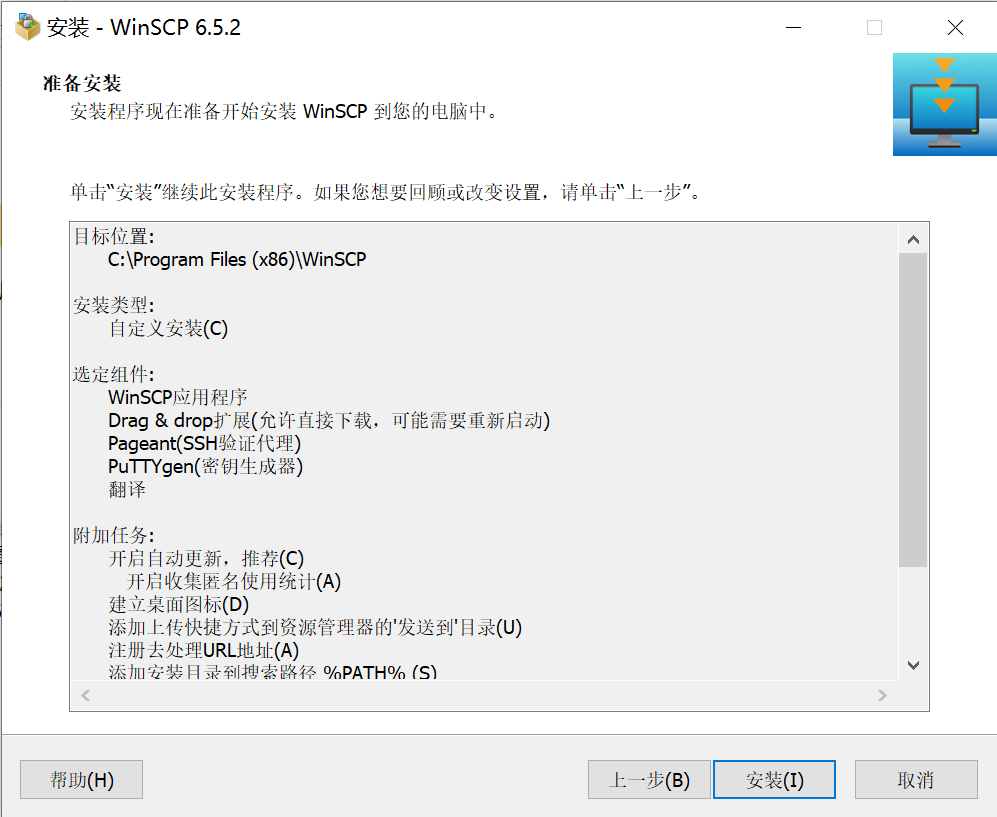
- Click “Install”:
- Open WinSCP:
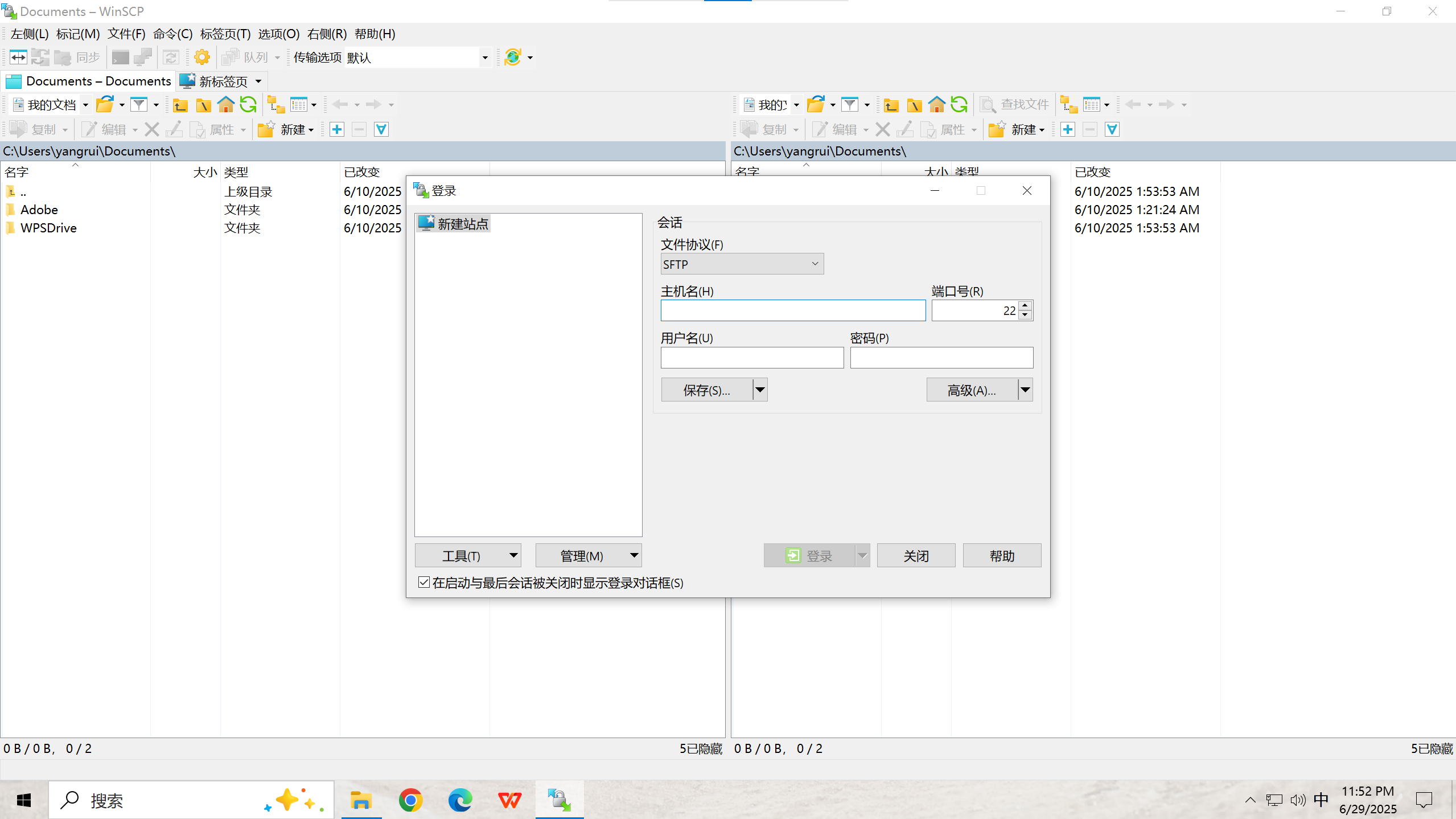
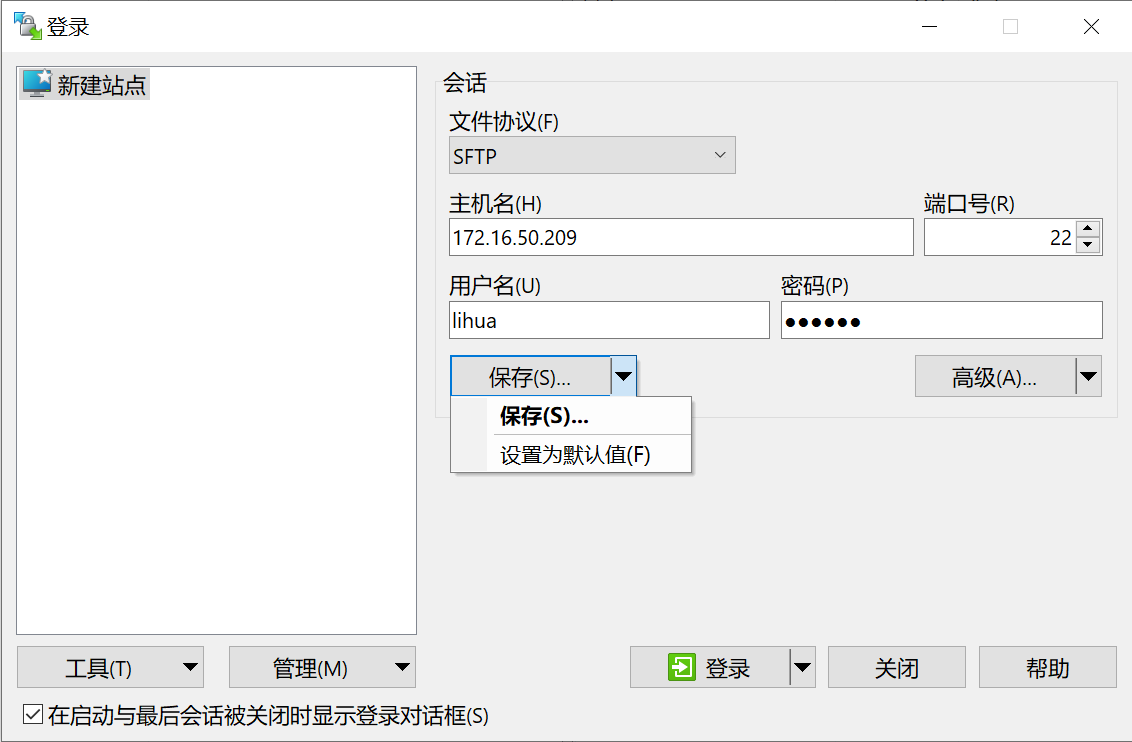
- Fill host name (
172.16.50.209), port (22), user name, as well as password, and then click “Save”:
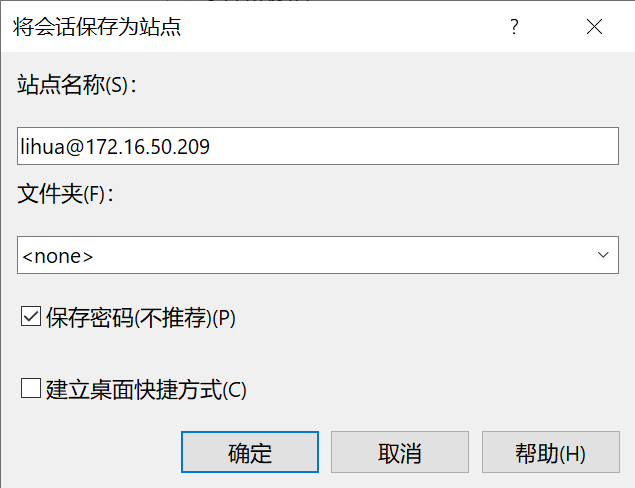
- Click “Confirm”: saving password is not recommended for safety consideration.
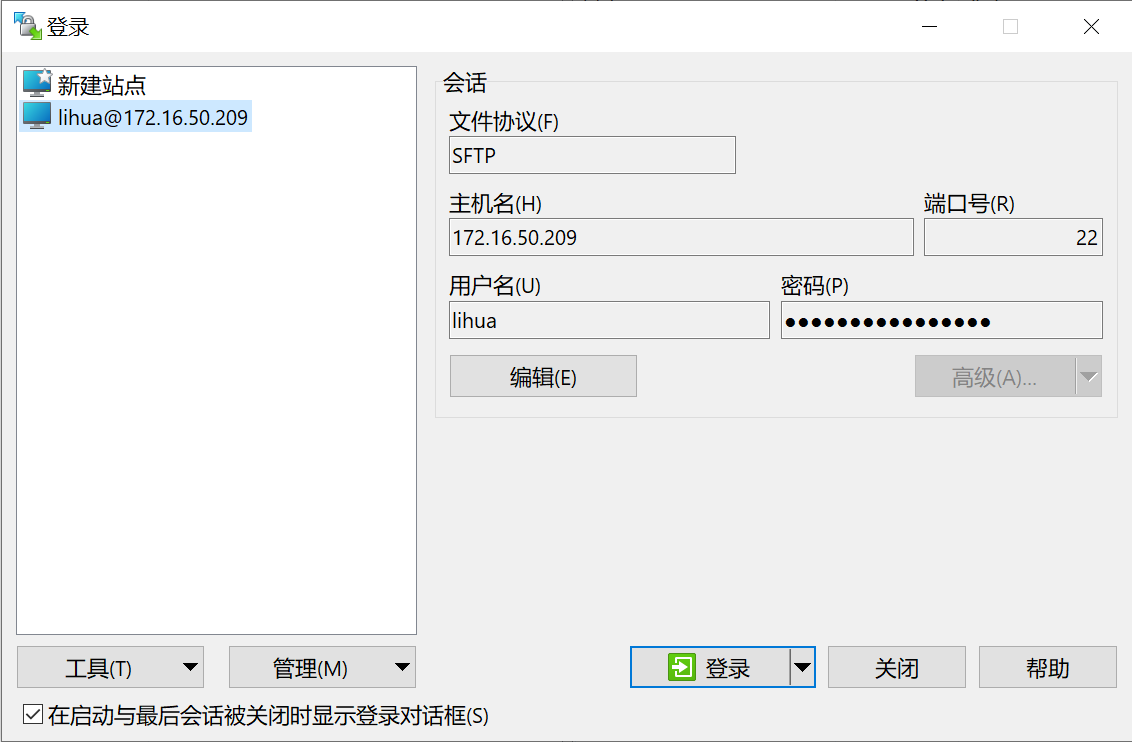
- Select saved session and then click “Login”:
- The main panel: